
MDF Viewer Support and Troubleshooting
MDF Viewer support starts with quick checks for the most common MDF file problems. Reach the SysTools team by chat, email or phone when you need more help.
Fix Common MDF Viewer Problems
MDF File Will Not Open
Copy the file to a normal folder first. Stop the SQL Server service or detach the database before you copy a live MDF file.
Start as Administrator
On Windows 7 to 11, right click the MDF Viewer icon and open it with administrator rights.
Install .NET Framework 4.5
MDF Viewer needs Microsoft .NET Framework 4.5 or above on your PC.
Add Every NDF File
Add every .ndf file of the database together with the .mdf file before you scan.
Free Edition Shows 500 Records
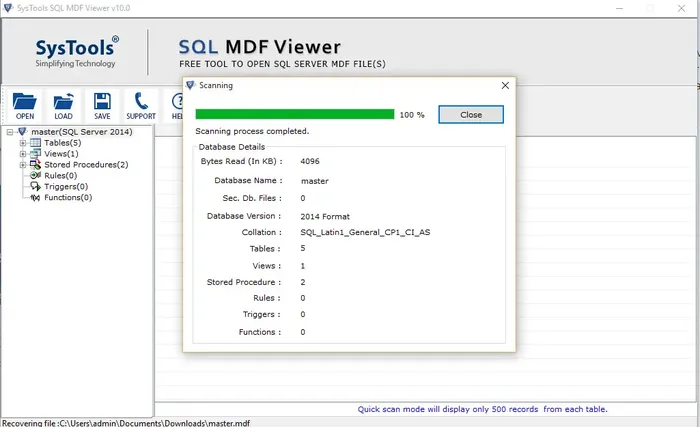
Quick scan mode in the free edition lists 500 records per table. Pro adds recovery and export.
SSMS Error 5120
Error 5120 means SQL Server could not open the file. Operating system error 5 points to missing permissions, and Microsoft lists the fixes in its error 5120 guide.
Check Your PC Before You Scan
Windows
Windows 7, 8, 8.1, 10 and 11, plus Windows Server 2008 to 2022.
Processor
Intel Core 2 Duo E4600 2.40 GHz.
Memory and Disk
4 GB RAM recommended and 100 MB of free disk space.
Framework
Microsoft .NET Framework 4.5 or above.
MDF Viewer opens files from SQL Server 2000, 2005, 2008, 2008 R2, 2012, 2014, 2016, 2017, 2019 and 2022.
Get Help From the SysTools Team
Live Chat
Ask the SysTools team about a scan, an error or an order without leaving your browser.
Support Email
Send install errors, scan problems and screenshots to the support team.
SysTools Support Portal
Select MDF Viewer from the product list on the official SysTools support site.
MDF Viewer Support Questions
How do I open an MDF file without SQL Server?
Install MDF Viewer, select Open, add your .mdf file and any .ndf files, then start the scan. Tables, views, stored procedures, rules, triggers and functions appear in the database tree.
Why does SQL Server Management Studio refuse my MDF file?
SQL Server rejects a file that is damaged, belongs to a newer version or sits where the service account lacks permission. Microsoft explains the attach rules in its detach and attach guide. MDF Viewer opens the file anyway so you can inspect it.
Can I open an MDF file without its LDF file?
Yes. MDF Viewer opens orphan MDF files, so a missing LDF file does not stop the scan.
Does MDF Viewer limit MDF file size?
No. MDF Viewer places no size limit on the MDF file you scan.
How soon does my license key arrive?
Pro and Restore Manager orders send a license key by email within 15 minutes. Write to sales@systoolsgroup.com when the email does not arrive.
What is the refund policy for MDF Viewer Pro?
Pro and Restore Manager carry a 30 day money back guarantee. Review the MDF Viewer refund policy or ask sales@systoolsgroup.com before you buy.
Still Stuck? Chat With the MDF Viewer Team
Send your MDF Viewer version and the error text for a faster answer.