
MDF Viewer to Open, View and Explore MDF Files
MDF Viewer opens damaged, orphan and offline MDF and NDF files without SQL Server. Browse tables, views, stored procedures, triggers, functions and indexes from SQL Server 2000 to 2022 in one window.

Why Choose MDF Viewer for MDF and NDF Files?
Detects MDF Corruption
MDF Viewer scans your file and flags damage before you open it. Corrupted, suspect and orphan MDF files still load for preview, even when SQL Server Management Studio refuses them.
Needs No SQL Server
Offline .mdf files load on their own in MDF Viewer. You skip the SQL Server install, instance setup and attach steps.
Previews Every Object
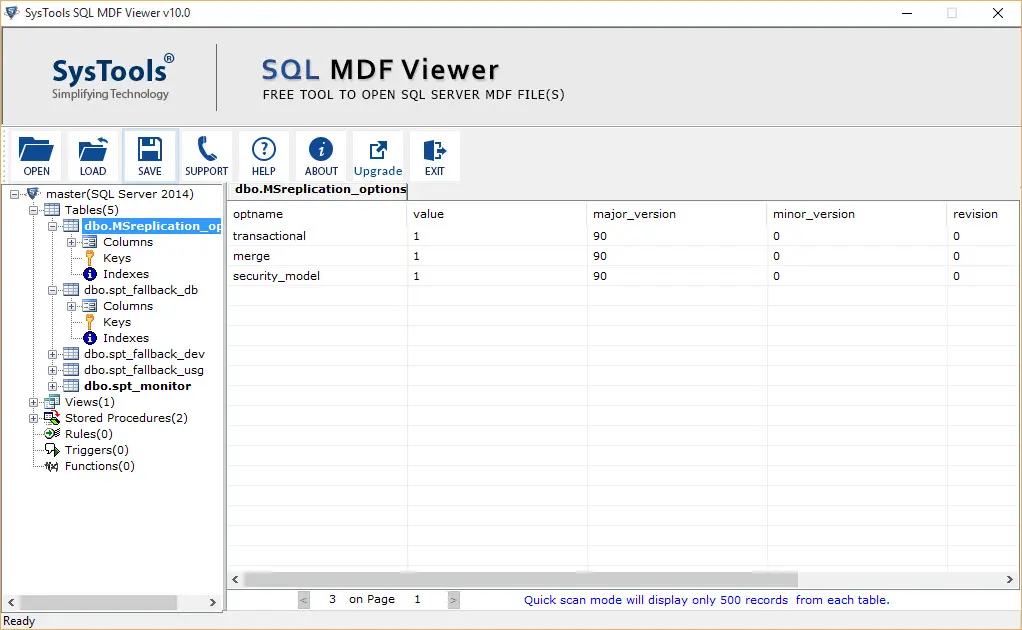
Tables, columns, keys, views, stored procedures, triggers, rules, indexes and functions appear in a tree after the scan.
Covers SQL Server 2000 to 2022
MDF Viewer scans MDF files from SQL Server 2000, 2005, 2008, 2008 R2, 2012, 2014, 2016, 2017, 2019 and 2022 and detects the version for you.
Scans MDF and NDF Files
Add primary and secondary database files and scan both for corruption in one pass.
Shows Deleted Records
Deleted, dropped and truncated records appear in red in the preview, so you see what your file held.
Highlights Tables With Data
Tables that hold data appear in bold and empty tables stand apart, which speeds up your first look at a large database.
Saves Your Scan Results
Save the scanned MDF file as a .str file and reload it later without scanning again.
Handles Large MDF Files
MDF Viewer sets no limit on MDF file size. Quick scan mode in the free edition previews 500 records per table.
When You Need an MDF Viewer
Orphan MDF After a Server Crash
Your server failed and only the .mdf file survived. MDF Viewer opens that orphan file on any Windows PC, so you check what your database held before planning a rebuild.
SSMS Refuses to Attach the File
SQL Server Management Studio stops at a damaged or incomplete file. MDF Viewer scans that file, flags damage and still shows the objects it finds.
Newer MDF on an Older Server
SQL Server cannot attach a database from a newer version to an older one. SQL MDF Viewer opens MDF files from SQL Server 2000 to 2022 without any instance.
Deleted Records and Evidence
Auditors and investigators preview tables, views, rules, triggers and functions without attaching the file to a live server. Deleted records show in red.
SQL Server Versions and System Requirements
MDF Viewer works with SQL Server 2022 and every release back to SQL Server 2000. Windows 11 and Windows Server 2022 are on the list too. Updated October 2026.
Operating System
Windows 7, 8, 8.1 and 10 in 32 and 64 bit. Windows 11 in 64 bit. Windows Server 2008, 2012 R2, 2016, 2019 and 2022.
Processor
Intel Core 2 Duo E4600 at 2.40 GHz.
Memory
4 GB RAM recommended.
Disk Space
100 MB of free hard disk space.
Software
Microsoft .NET Framework 4.5 or above.
Permissions
On Windows 7 to 11, start MDF Viewer with Run as Administrator.
What Is an MDF File in SQL Server?
MDF stands for Master Database File. SQL Server stores the schema and data of a database in this primary file. Secondary data files use .ndf and transaction logs use .ldf.
Damage to the file locks you out of your database. MDF Viewer opens the file again so you can inspect what is inside.
Microsoft lists the three file types in its database files and filegroups guide.
Why MDF Files Get Corrupted
How to Open an MDF File With MDF Viewer
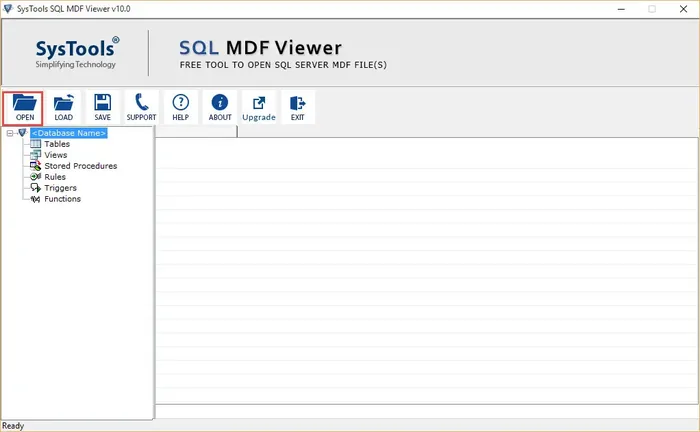
Open Your MDF File
Install MDF Viewer, start it as administrator and select Open in the toolbar. Browse to your .mdf file and add it.
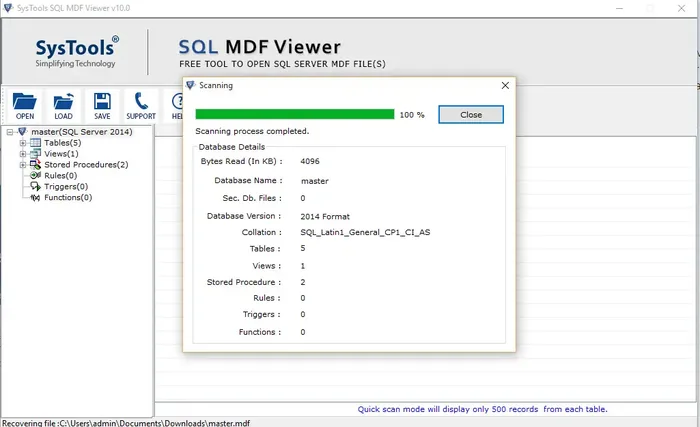
Scan the Database
MDF Viewer scans your file in Quick scan mode and reports the database name, version, collation and object counts.
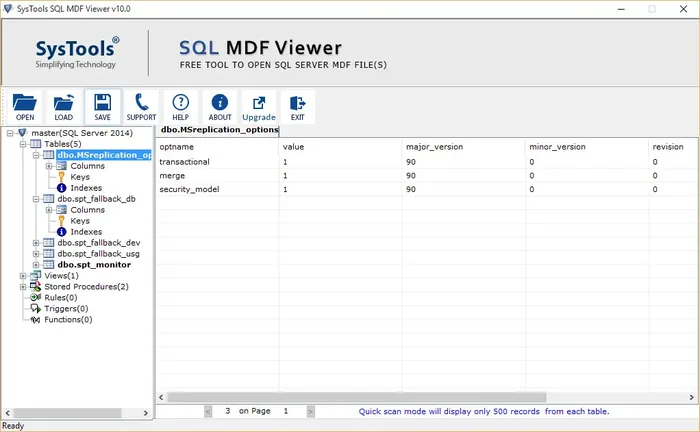
Preview Tables and Objects
Expand tables, views and stored procedures in the tree to view records in the right pane.
Open an MDF File Without Attaching It
Swipe sideways to see every column →
| What You Check | MDF Viewer | Attach in SSMS |
|---|---|---|
| SQL Server instance | Not needed. MDF Viewer opens the file on its own. | Required. You attach the file to a live instance. |
| File version | Files from SQL Server 2000 to 2022 open in one program. | Databases from a newer version can't attach to an earlier one. |
| Data files | Add the .mdf file and any .ndf files, then scan them. | All .mdf and .ndf files must be available at the paths SQL Server expects. |
Attach limits come from Microsoft's detach and attach guide.
Compare Free and Pro Editions
Free scans your file and previews the data. Pro recovers MDF file data and exports it to a SQL Server database, SQL scripts or CSV files. Restore Manager adds password recovery, BAK recovery and LDF analysis. Pro costs $249 for one machine. Restore Manager costs $299 per machine per month.
Swipe sideways to see every column →
| Features | Free $0 | Pro $249 | Restore Manager $299 per month |
|---|---|---|---|
| Add and scan MDF file | |||
| View corrupt MDF file information | |||
| Save scanned MDF file | |||
| Preview MDF file data | |||
| View MDF file without SQL Server | |||
| Auto detection of SQL Server version | |||
| Recover and export MDF file data | |||
| Recover password from SQL database | |||
| Recover BAK of SQL database | |||
| Analyze BAK and LDF file | |||
| Export decrypted SQL database | |||
| Preview decrypted SQL database | |||
| Export corrupted .bak and .ldf file | |||
| Download | Purchase Now | Purchase Now |
Pro and Restore Manager come with a 30 day money back guarantee, 1 year of free updates and a license key by email within 15 minutes.
Explore More SQL Server Recovery Tools
Free SQL MDF Recovery
Recover corrupted MDF and NDF database files.
View Tool →Free SQL Backup Recovery
Recover SQL Server databases from corrupted .bak files.
View Tool →Free SQL MDF Password Recovery
Reset lost SA and user passwords from the master.mdf file.
View Tool →Free SQL LDF Viewer
Open and analyze SQL Server transaction log files.
View Tool →Free SQL Decryptor
Remove encryption from stored procedures, views, functions and triggers.
View Tool →Free SQL Restore Manager
Restore MDF, NDF and master databases from one console.
View Tool →What Users Say About MDF Viewer
Frequently Asked Questions About MDF Viewer
Quick scan mode shows 500 records
per table in the free edition.
Is MDF Viewer free?
Yes. MDF Viewer is a free download that opens, scans and previews MDF and NDF files. Quick scan mode shows 500 records per table in the free edition, and Pro adds recovery and export.
Do I need SQL Server to view MDF files?
No. MDF Viewer works as a standalone program, so you add offline .mdf files without installing SQL Server.
Which SQL Server versions are supported?
MDF Viewer opens MDF files from SQL Server 2000, 2005, 2008, 2008 R2, 2012, 2014, 2016, 2017, 2019 and 2022. MDF Viewer detects your file version automatically.
Can MDF Viewer open corrupted MDF files?
Yes. MDF Viewer processes corrupted, suspect and orphan MDF files from SQL Server databases. MDF Viewer flags damage during the scan, then lists the objects it finds in a tree.
Download MDF Viewer and Open Your MDF File
Free download. No SQL Server installation needed.
Questions before you download? Email support@systoolsgroup.com or call +1 888 900 4529.