
About MDF Viewer and the Team Behind It
MDF Viewer opens MDF and NDF files for database administrators, developers and IT teams, with no SQL Server install. SysTools Group builds the software and answers your questions.
Why MDF Viewer Exists
You receive an MDF file from a failed server, an old backup or a client. SQL Server Management Studio refuses to attach it, and setting up a SQL Server instance just to look inside slows you down.
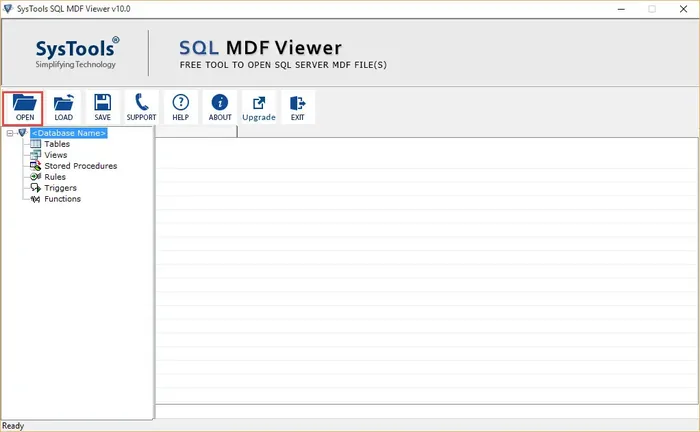
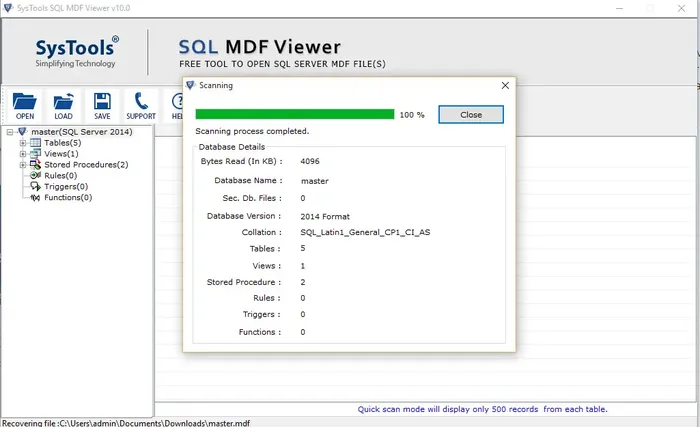
MDF Viewer was built for that moment. You add the file, scan it and browse tables, views, stored procedures, rules, triggers and functions in a database tree.
SysTools Group, a software company established in 2007, keeps MDF Viewer free to download so you can see your data before you spend anything on recovery.
What MDF Viewer Does for You
Opens MDF and NDF Files
Add your .mdf file and any .ndf files, then start the scan.
Works Without SQL Server
Offline files load in MDF Viewer by themselves. No instance is needed.
Flags Damaged Records
Deleted, dropped and truncated records show in red. Tables that hold data show in bold.
Detects the SQL Server Version
MDF Viewer identifies files from SQL Server 2000 to 2022 on its own.
Saves Your Scan
Store a scan as an .str file and load it later without scanning twice.
Previews Table Data
Free quick scan mode lists 500 records from every table.
Who Uses MDF Viewer
Database Administrators
Check an MDF file from a failed server before you choose a recovery path. MDF Viewer shows damage and object counts as soon as the scan ends.
Developers and Testers
Open a database file from a client or a test machine without setting up an instance. You browse the schema and sample data, then move on.
IT Consultants
Inspect database files from customers on a plain Windows laptop. You report what you found before you quote a fix.
Explore Our SQL Server Tools
Free SQL MDF Recovery
Repair a damaged database file and open the tables inside.
View Tool →Free SQL Backup Recovery
Restore data from a .bak file that SQL Server will not open.
View Tool →Free SQL MDF Password Recovery
Regain access when nobody remembers the SA login.
View Tool →Free SQL LDF Viewer
Inspect the entries stored in a transaction log file.
View Tool →Free SQL Decryptor
Make encrypted procedures, views and triggers visible again.
View Tool →Free SQL Server Database Restore Manager
Bring several databases back from one console.
View Tool →Get Help From Our Team
Questions about a scan, a license or an order go straight to the SysTools team. Chat, email and phone are open to every MDF Viewer user.
Start with the quick fixes on the support page when an MDF file will not open. Contact the team when you need a person.
Phone
+1 888 900 4529 in the US
+44 800 088 5522 in the UK
Live Chat
Chat with the team from any page of the site.
About MDF Viewer Questions
Who makes MDF Viewer?
SysTools Group builds and maintains MDF Viewer. SysTools Group is a software company established in 2007 that builds data recovery, migration and backup software.
Is MDF Viewer free to download?
Yes. You can download MDF Viewer for free and use it to scan and preview MDF and NDF files. Pro adds recovery and export for $249.
Which Windows versions does MDF Viewer support?
MDF Viewer works on Windows 7, 8, 8.1, 10 and 11, plus Windows Server 2008, 2012 R2, 2016, 2019 and 2022. Windows 11 needs the 64 bit edition.
How do I get help with MDF Viewer?
Use Live Chat, email support@systoolsgroup.com or call +1 888 900 4529 in the US and +44 800 088 5522 in the UK. Visit MDF Viewer support for quick fixes before you write.
Open Your MDF File With MDF Viewer Today
Get the free download and scan your first file today.