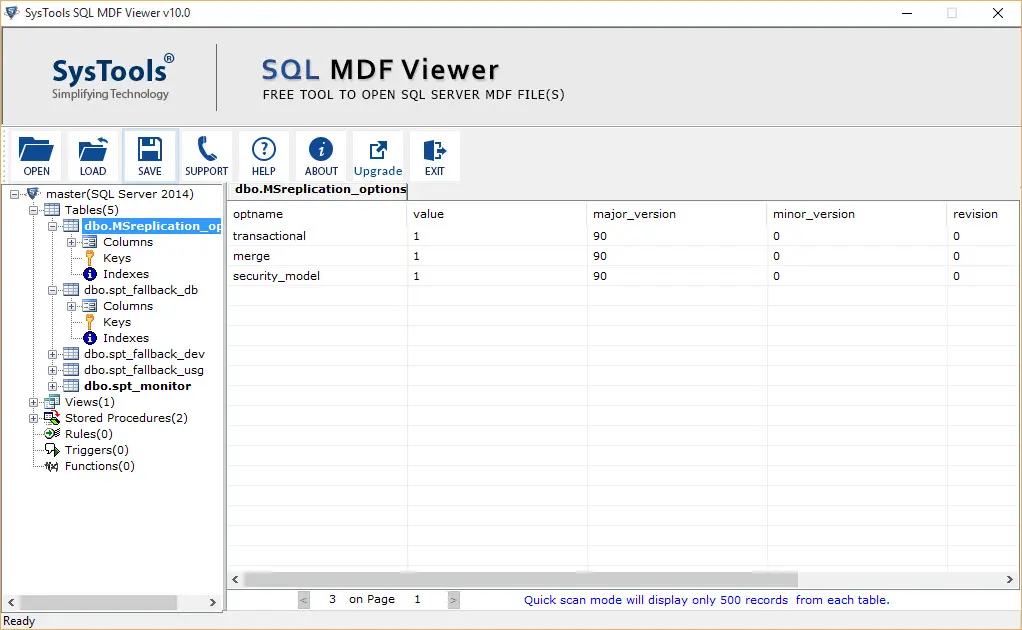
A smart solution to efficiently open and view damaged or orphan MDF Files. Easily view the database objects like Tables, Functions, Indexes, Triggers, and other database objects, without installing SQL Server setup.
Download for Free

A smart and prominent tool to securely view the data stored in MDF files. With this freeware utility, a user can view corrupted and damaged MDF files without installing SQL Server. The primary features of the MDF file opener are:
Trusted By 50+ Satisfied Customers
This advanced MDF File Opener is designed to open damaged or orphan SQL MDF Files accurately. Additionally, if the files are damaged or corrupted, this utility can detect it and offer preview of the database objects.
The utility is a standalone solution, allowing users to view SQL database file without SQL Server. The feature enables users to easily add their offline .mdf files and view all database objects without SQL Server installation.
This advanced utility offers complete scanning and preview of the MDF files. There is no limitation with the SQL Server versions, as the tool is compatible with and supports all SQL Server versions efficiently.
After the scan of MDF files, the tool provides a complete preview of all data. This includes database objects, such as Functions, Views, Tables, Indexes, Stored Procedures, etc. Users can view all this data easily with the MDF File Viewer.
This advanced software to open MDF files also allows users to scan their MDF files for any damage or corruption. With this efficient feature, users can detect any corruption in their respective MDF Files.
In case a user has accidentally deleted some records from the MDF file, this utility can seamlessly restore them. This feature helps users restore the data that might have been accidentally deleted due to human error or any other reason.
The Master Database File (MDF) is the primary database file format used by Microsoft SQL Server. These files store the entire schema and data of the SQL Server database. Here are some of the other components stored in MDF Files:
In case these MDF files get damaged or corrupted, it becomes impossible for the users to load their SQL databases and further work on them. This is where the MDF File Viewer helps. The utility allows users to recover the affected database and view the data in a hassle-free way.
Users often encounter several issues in SQL Server database files. Here are some of the reasons the MDF File gets corrupted:
All these causes affect the entire database accessibility and restrict users from viewing their data. In such situations, continuing with the workflow becomes much more complex till the database file (MDF) isn’t recovered completely.
Here are the steps to view MDF files.
To read the MDF file data, follow these steps:
View Database Components Easily
This advanced utility allows you to Open, Read, and View the database files after recovering them from a damaged state.
With the smart built-in features of the solution, it becomes much efficient for the users to inspect for corruption or other damages in the database. Furthermore, with the pro version of MDF File Opener, users can not only recover the corrupted MDF files, but also export them to the desired database.
Download Now →
| Features |
Free |
$249 |
$999 |
|---|---|---|---|
| Add & Scan MDF File | ✓ | ✓ | ✓ |
| Read Corrupt MDF File Information | ✓ | ✓ | ✓ |
| Save Scanned MDF File | ✓ | ✓ | ✓ |
| Preview MDF File Data | ✓ | ✓ | ✓ |
| View MDF File Without SQL Server | ✓ | ✓ | ✓ |
| Auto Detection of SQL Server Version | ✓ | ✓ | ✓ |
| Advance Scanning Option | ✓ | ✓ | ✓ |
| Recover & Export MDF File Data | ✗ | ✓ | ✓ |
| Recover Data from MDF File | ✗ | ✓ | ✓ |
| Recover Password from SQL Database | ✗ | ✗ | ✓ |
| Recover BAK of SQL Database | ✗ | ✗ | ✓ |
| Export Decrypted SQL Database | ✗ | ✗ | ✓ |
| Analyze BAK and LDF File | ✗ | ✗ | ✓ |
| Preview Decrypted SQL Database | ✗ | ✗ | ✓ |
| Export Corrupted .bak and .ldf File | ✗ | ✗ | ✓ |
Trusted Customer Reviews on SQL MDF Opener Tool